Understand and manage product costs
Use receipt costs to follow what you pay, or set a deliberate standard cost for a stable planning basis. Learn how packs, recipes and portions become comparable costs, and how to check the result before making pricing decisions.
Start with the cost of one stock unit
Product costs are held per base stock unit, such as one g, one ml or one each, in the business currency. A Supplier Product price is normally the net price of one purchase unit, such as a case. Flexitill converts that case into base stock before calculating an ingredient or portion cost. Purchase VAT is separate from the net receipt cost.
Choose the costing approach for your restaurant
Automatic from receipts or supplier — follow purchasing costs
A good choice for regularly purchased food, drinks and ingredients when you keep receipts accurate. Cost follows the recorded received average; before received costs exist, the preferred supplier price provides an estimate. Costs can change as new stock arrives, so review menu margins when purchase prices rise.
Standard cost — use a deliberate fixed basis
Choose this when you want a stable planning cost, a budgeted ingredient allowance or an explicitly maintained cost for a purchased non-stock ingredient. You control when the figure changes. It will not automatically follow supplier inflation or actual receipt prices, so assign someone to review it regularly.
Automatic from production or recipe — for in-house products
Prepared stock uses recorded production cost when available, otherwise a current Recipe estimate. Made-to-order costing follows the Recipe ingredients. The distinction matters when today's ingredients cost more than an already-prepared batch; see the manufactured-product guidance below.
Average cost, latest received cost and preferred supplier price are not three independently selectable modes. They are the automatic fallback chain. There is no separate “always use the newest supplier quote” or “always use the latest receipt” option in this control.
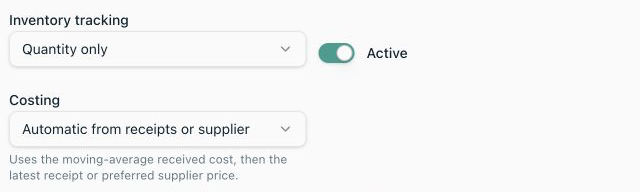
What does the automatic-cost helper text mean?
“Uses the moving-average received cost, then the latest receipt or preferred supplier price.” means: use the first available cost in this order, and stop looking once one is found.
- 1Moving-average received cost: use the Product's stored average cost per base unit. This is normally available after a priced receipt has been posted.
- 2Latest received cost: only if no average exists, use the stored last received cost per base unit. This is a fallback, not an instruction to replace an older average with the latest price.
- 3Preferred supplier price: only if neither received cost exists, convert the active preferred Supplier Product's net price into cost per base unit. This is an estimate, not evidence of an actual purchase.
- 4No usable source: show missing or incomplete cost. Fix the source data instead of treating the unknown amount as zero.
Understand a moving average with a delivery example
When a positive, priced receipt adds stock, Flexitill weights the old average by the quantity remaining immediately before that receipt. It then adds the incoming quantity at its new cost. It does not simply average two invoice prices or give every delivery equal weight.
- 1You have 2,000 g of flour at CZK 0.04/g: a carried cost of CZK 80.
- 2A delivery adds 3,000 g costing CZK 180 net: CZK 0.06/g.
- 3The new average is (80 + 180) ÷ 5,000 = CZK 0.052/g. A 200 g ingredient portion now costs CZK 10.40.
- 4After consumption leaves 500 g, a further 1,000 g arrives at CZK 0.08/g. The next average is (500 × 0.052 + 1,000 × 0.08) ÷ 1,500 = approximately CZK 0.070667/g. Only the remaining 500 g carries the previous average into this calculation.
If no old average exists, or stock before the receipt is zero or negative, the new average starts at that receipt's cost. Negative prior stock contributes zero weight. Consumption reduces the quantity used in the next calculation; it does not itself calculate a new average. The latest received cost is also stored separately when the receipt is posted.
This is a shared Product cost across the business's inventory balances, including locations, Storage Areas and Variants. Selecting a location or Variant does not give it an independent moving average. FIFO, FEFO and Storage Area priorities choose which physical stock to issue; they are not alternative cost-calculation modes.
Set up the preferred supplier estimate correctly
Where to find it·Inventory → Products → choose a Product → Supplier products
- 1Add or edit the Supplier Product for the purchased Product. Check the supplier identity and the purchase unit: one case, one jar or one kg are different price bases.
- 2Enter Pack cost as the net price for one purchase unit, not for one inner item unless that inner item is what you order.
- 3Choose a reusable Product pack or configure the supplier conversion. Check the 'Adds … per purchase unit' statement against the usable stock you receive.
- 4Keep the offering Active and select Preferred for the offering whose price should supply the automatic estimate. The first active offering is selected automatically; with multiple offerings, make the choice explicit.
- 5Save, return to Cost & margin and refresh the preview. Supplier price is used only when automatic costing has no received basis.
Example: a case of six 400 g tins costs CZK 240 net and adds 2,400 g. The supplier estimate is 240 ÷ 2,400 = CZK 0.10/g; 150 g costs CZK 15. If stock is measured as drained usable contents, use that usable quantity in the conversion, not the packaging's gross weight. Choosing another supplier does not average the two quotes or pick the cheapest automatically.
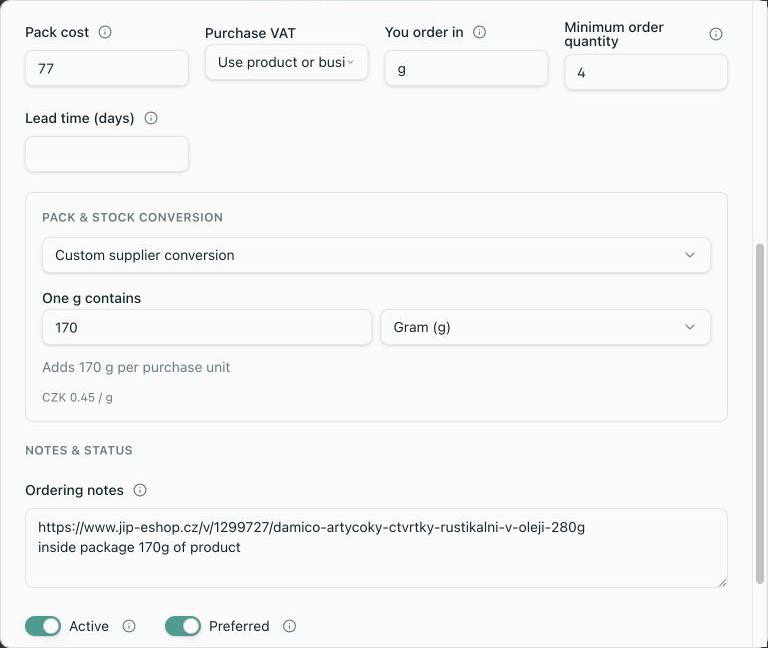
During receiving, check the actual net price and stock-added quantity before posting. Receipt cost per base unit is the line's net value divided by the base quantity received. A missing receipt price can become a zero cost; do not post zero as a placeholder for an unknown invoice. See Purchasing & Deliveries for the full supplier and receipt workflows.
Configure or change a standard cost
Where to find it·Inventory → Products → choose a Product → Edit → Costing
- 1Confirm the Product's stock unit before entering a value. You can also choose costing while creating a purchased Product.
- 2Select Standard cost. Enter the net amount for exactly one base unit in Standard cost per g, per ml or per each, as labelled.
- 3For a target cost of CZK 50/kg on a Product stocked in g, enter 0.05 per g. Enter zero only when you deliberately want zero cost, not when the amount is unknown.
- 4Save the Product, refresh Cost & margin, and expand the breakdown to check the source and a familiar portion quantity.
- 5When you want receipt-driven costs again, edit Costing, choose Automatic and save. Recheck the preview; an existing received average takes priority over the current supplier quote.
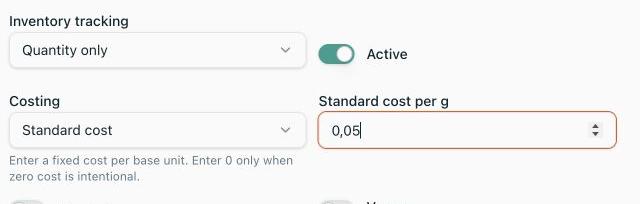
For a directly consumed purchased or prepared Product, a valid standard cost takes priority over received and supplier costs. It is not added on top of them. Receipts still retain their actual costs and update the received-cost fields while Standard is selected, but they do not change the fixed standard you entered. A missing standard is not permission to silently use a supplier price; enter a valid value or choose Automatic.
Cost prepared batches and made-to-order dishes
Prepared stock: what the batch cost versus what it would cost now
A sauce made in advance is Prepared stock. Automatic costing uses its recorded average production cost, then its last recorded cost; without a recorded basis it can estimate from the active Recipe. A valid standard cost can instead give this directly consumed stock a fixed basis.
For a Recipe whose ingredients total CZK 150 and yield 3,000 g, the estimated output cost is CZK 0.05/g. A 100 g portion costs CZK 5. If usable yield is only 2,500 g for the same ingredients, the estimate is CZK 0.06/g. Set yield to usable output, accounting for expected loss.
Cost & margin can show a current Recipe comparison alongside the prepared Product's recorded cost. These answer different questions: what existing production cost, and what making the Recipe now would cost. The comparison is not added to the prepared-stock cost a second time. A Recipe estimate also does not create a recorded production value for on-hand inventory.
Made to order: cost the ingredients used by the sale
A pizza made when ordered consumes its Recipe ingredients, rather than a previously produced pizza balance. The Cost & margin sale preview expands that Recipe, converts ingredient quantities into their base units and totals the consumed costs. Nested made-to-order Recipes are expanded too; prepared ingredients use their own cost basis.
Active, in-date substitutions can redirect ingredient costing to the substitute and multiply it by the conversion factor. For example, a factor of 1.2 and substitute cost of CZK 0.05 per base unit produces CZK 0.06 for each original base unit required. This does not revalue the original Product's own stock as if it were substitute stock. Product Variants can have separate quantities but still share the parent Product's cost basis; a Variant preview is marked as an estimate.
Global Units, Product packs and density must resolve each ingredient to base stock correctly. See Recipes, Units and conversions for configuration and examples. Recipe material cost does not automatically add labour, preparation time, energy, overheads or transaction charges.
Check a portion cost and its margin
Where to find it·Inventory → Products → choose a Product → Cost & margin
- 1Save any Product or Supplier Product edits, then refresh Cost & margin. The preview reads saved data.
- 2Enter Amount consumed per sale. Use a different unit for a compatible measurement or pack, or select a Variant where applicable, then Calculate.
- 3Expand Cost breakdown. Check the consumed quantity, cost per unit, line total and source: average received cost, last received cost, standard cost, preferred supplier estimate or Recipe estimate.
- 4Resolve incomplete-cost warnings before relying on a total. If there is no selling price, you can still inspect cost, but profit and margin cannot be calculated.
- 5Check the actual Menu Item as well. The Product preview uses its fallback selling price once for the selected quantity; increasing the consumed quantity does not multiply that selling price. Menu Items have their own prices and consumption configuration.
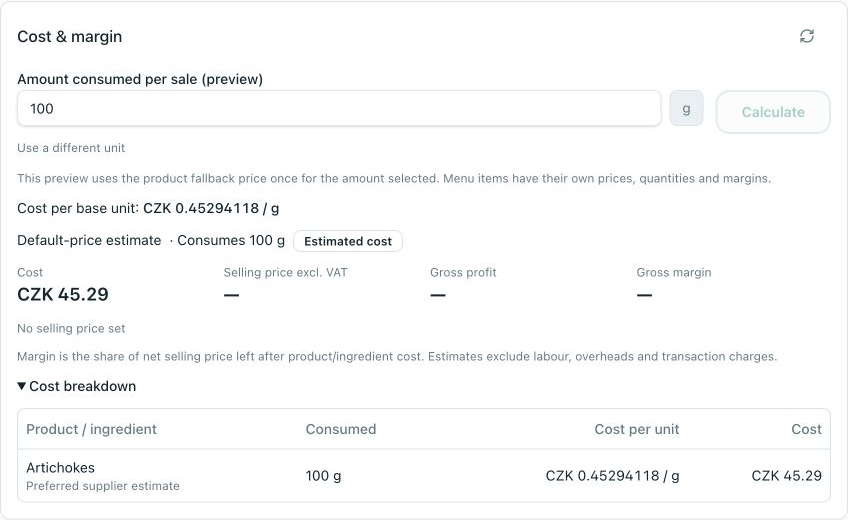
Gross profit = selling price excluding VAT − material cost. Gross margin = gross profit ÷ selling price excluding VAT × 100. For a net sale of CZK 100 and cost of CZK 30, profit is CZK 70 and margin is 70%. Margin is not markup and is not final restaurant profit. A zero net selling price has no calculable percentage margin; a loss can show a negative margin.
Investigate unexpected or incomplete costs
The supplier price changed but Product cost did not
Check Average cost and Last cost in Product details. An existing automatic received basis wins over the preferred supplier estimate. Post accurate new receipts to update the moving average, or deliberately maintain a Standard cost; do not create artificial deliveries to force a price change.
The cost is 1,000 times too high or low
Check g versus kg, ml versus l, the Product base unit, pack contents and whether Pack cost was entered per case or per inner item. For mass-to-volume conversions, check Product density. Fix the incorrect definition or source transaction.
Estimated is shown
A supplier list price, Recipe fallback or shared Variant cost is being used. An estimate can have a complete numeric total, but is not a separate actual receipt cost for that exact stock identity.
Incomplete or unknown is shown
Look for a missing cost, missing or incompatible Unit, invalid pack conversion or density, missing Recipe/ingredient, or a substitution/Recipe cycle. A known-cost subtotal omits unresolved amounts and is not a trustworthy final cost. Zero and unknown are different.
A non-stock ingredient still needs costing
Inventory tracking and costing are different choices. A purchased non-stock ingredient can contribute to Recipe cost without receiving an on-hand balance. Maintain its standard or eligible preferred-supplier cost rather than expecting a stock receipt to establish it.
After correcting or voiding a receipt
Use the Delivery correction or void workflow with a reason and the required permissions and correction window. Do not hide a wrong receipt price by editing an unrelated supplier quote. Recheck the Product cost after the correction is complete.
If you cannot edit the relevant records, ask a manager with Product, Supplier Product or Delivery permissions to make the change. Verify the corrected source and refreshed breakdown before changing menu prices.